This document breaks down the mathematical foundation for converting 3D world coordinates into 2D image coordinates (Forward Transformation) and vice-versa (Backward Transformation), as outlined in the provided calculations, implemented in Python for demonstration.
Perspective Transformation Basics
Coordinate System Convention
We establish a standard right-handed 3D coordinate system to map space:
- X-axis : Width (horizontal movement)
- Y-axis : Height (vertical movement)
- Z-axis : Depth (distance from camera focal plane)
Rotational Degrees of Freedom (Euler Angles)
Rotations are defined around the principal axes:
- Tilt : Pitch rotation around the X-axis (pivoting up/down).
- Pan (): Yaw rotation around the Y-axis (pivoting left/right).
- Roll (): Roll rotation around the Z-axis (canting side-to-side).
Homogeneous Coordinate Vector
In computer vision and computer graphics packages (such as OpenCV), 3D points are represented using 4D homogeneous coordinates:
\vec{p} = \begin{bmatrix}
X \\
Y \\
Z \\
1 \\
\end{bmatrix}
Homogeneous coordinate representations allow us to combine both rotation (multiplication) and translation (displacement) into uniform matrix chains.
\mathbf{RT} =\begin{bmatrix}
R_{00} & R_{01} & R_{02} & T_x \\
R_{10} & R_{11} & R_{12} & T_y \\
R_{20} & R_{21} & R_{22} & T_z \\
0 & 0 & 0 & 1 \\
\end{bmatrix}
The Camera Imaging Law
Based on the geometric principles of similar triangles in a pinhole camera model,
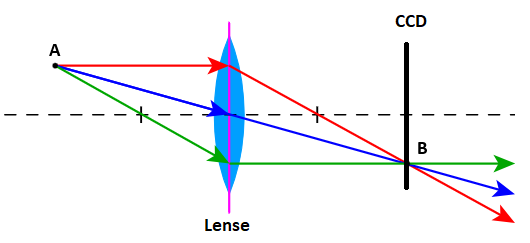
the relationship between a physical object height A at depth distance a, and its projected sensor image height B at focal plane distance b (focal length f) is defined by:
\frac{A}{a} = \frac{B}{b}Forward Transformation: 3D to 2D Screen Space
The forward transformation projects a known 3D point in the real world onto
the 2D digital image sensor plane as pixel coordinates using Imaging Law
B=\frac{b}{a}\cdot A Digital Sensor Origin Offset
A physical sensor coordinates origin sits directly on the optical axis. Digital image files, however, place at the top-left corner. We shift the projection to ensure all coordinates map to positive pixel indices:
B_{offset} = B + \frac{B_{max}}{2} Where is the maximum horizontal () or vertical () screen resolution.
Coordinate Projection Formulas
By combining the imaging law with the offset, and inverting the vertical Y-axis (as image pixel indices increase downwards), we obtain:
\begin{aligned}
x_B' = \frac{x_A}{z_A} \cdot f_x + \frac{W}{2} \\
y_B' = -\frac{y_A}{z_A} \cdot f_y + \frac{H}{2}
\end{aligned}
Where and represent the horizontal and vertical focal lengths scaled into pixel units.
Camera Intrinsic Matrix
These projection steps are represented compactly using the Intrinsic Matrix :
\mathbf{B}_b = \begin{bmatrix}
 f_x & 0 & \frac{W}{2} & 0 \\
 0 & -f_y & \frac{H}{2} & 0 \\
 0 & 0 & 1 & 0 \\
 0 & 0 & 1 & 0 \\
\end{bmatrix}
Multiplying a 3D point in the camera coordinate frame by the intrinsic matrix yields the intermediate vector:
\mathbf{p}'_{cam} = \mathbf{B}_f \cdot \vec{p}_{real} The final digital pixel coordinates are obtained by dividing the output coordinates by the scale depth (homogeneous perspective division).
\begin{bmatrix}
 x'_B\; z_A \\
 y'_B\; z_A \\
 z_A \\
 z_A \\
\end{bmatrix}=
\begin{bmatrix}
\frac{W\:a_0}{A_{x,max}} & 0 & \frac{W}{2} & 0 \\
0 & -\frac{H\:a_0}{A_{y,max}} & \frac{H}{2} & 0 \\
0 & 0 & 1 & 0 \\
0 & 0 & 1 & 0 \\
\end{bmatrix} \cdot
\begin{bmatrix}
 x_A \\
 y_A \\
 z_A \\
 1 \\
\end{bmatrix}
\vec{p}_{cam}=\frac{1}{z_A}\cdot \mathbf{p}'_{cam}=\frac{1}{z_A}\cdot \begin{bmatrix}
x'_B\; z_A \\
y'_B\; z_A \\
z_A \\
z_A \\
\end{bmatrix}=\begin{bmatrix}
x_B \\
y_B \\
1 \\
1 \\
\end{bmatrix}Full Camera Coordinate Pipeline (with Extrinsics)
When the camera is rotated and translated in world space, we must apply rotation matrices
( for tilt, for pan) and translation matrix () prior to intrinsic projection.
Demonstrated on a real setup see following example:
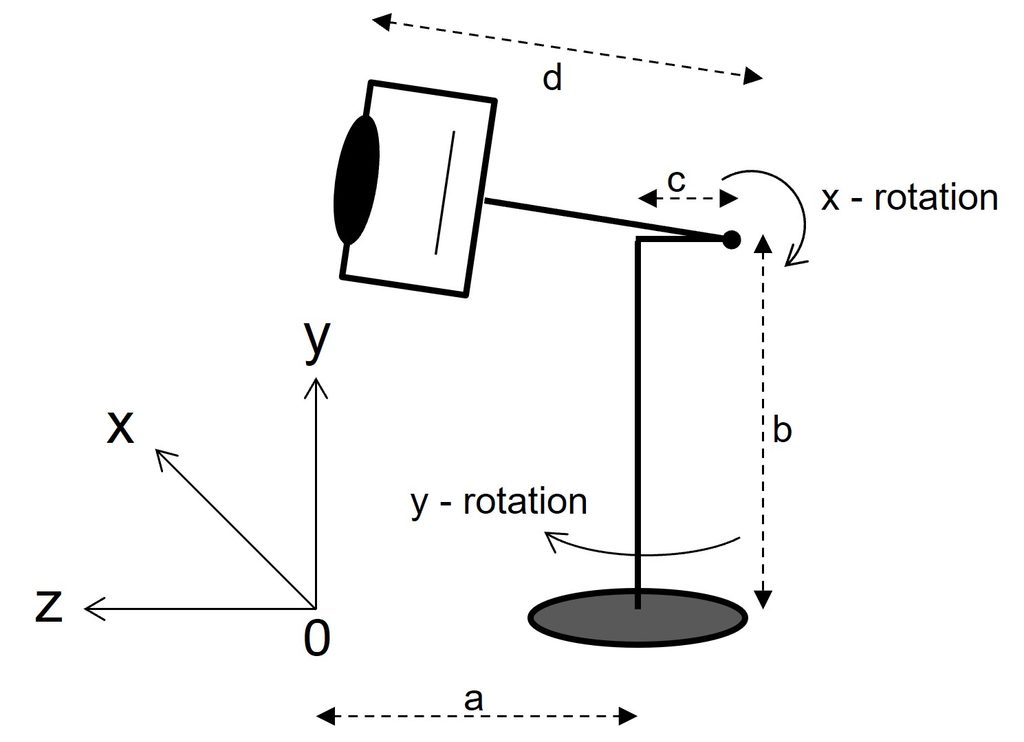
Transformation by d on Z-axis and Rotation X-axis (tilt=bend) with angle :
\mathbf{R}_{x,(\alpha)}=\begin{bmatrix}
 1 & 0 & 0 & 0 \\
 0 & cos(\alpha) & -sin(\alpha) & 0 \\
 0 & sin(\alpha) & cos(\alpha) & d \\
 0 & 0 & 0 & 1 \\
\end{bmatrix}
Transformation by c on Z-axis, b on Y-axis and Rotation Y-axis (pan=turn) with angle :
\mathbf{R}_{y,(\beta)}=\begin{bmatrix}
 cos(\beta) & 0 & -sin(\beta) & 0 \\
 0 & 1 & 0 & b \\
 sin(\beta) & 0 & cos(\beta) & c \\
 0 & 0 & 0 & 1 \\
\end{bmatrix}
Transformation by a on Z-axis:
\mathbf{T}_r=\begin{bmatrix}
 1 & 0 & 0 & 0 \\
 0 & 1 & 0 & 0 \\
 0 & 0 & 1 & a \\
 0 & 0 & 0 & 1 \\
\end{bmatrix}
Full pipline equation:
\mathbf{p}'_{cam}=\mathbf{B}_f\cdot \mathbf{R}_{x,\alpha}\cdot \mathbf{R}_{y,\beta} \cdot \mathbf{T}_r \cdot \vec{p}_{real}\mathbf{p}_{cam}=\frac{1}{z_A}\cdot \mathbf{p}'_{cam}Following Python code implements the camera intrinsic matrix , the translation matrix and the rotation matrices , within function PerspectiveTransformation.
# Perspective transformation matrice calculation
def PerspectiveTransformation(a, b, c, d, x_rot, y_rot):

    # x-axis rotation
    ax = math.radians(x_rot)
    # y-axis rotation
    by = math.radians(y_rot)

    # Camera Matrix
    Bb = np.array([
        [f, 0.0, w/2, 0.0],
        [0.0, -f, h/2, 0.0],
        [0.0, 0.0, 1.0, 0.0],
        [0.0, 0.0, 1.0, 0.0]
    ], dtype=np.float32)

    # Movement d on z-axis and Rotation about x-axis Matrix
    Rx = np.array([
        [1.0, 0.0, 0.0, 0.0],
        [0.0, math.cos(ax), -math.sin(ax), 0.0],
        [0.0, math.sin(ax), math.cos(ax), d],
        [0.0, 0.0, 0.0, 1.0],
    ], dtype=np.float32)

    # Movement b on y-axis, c on z-axis and Rotation about y-axis Matrix
    Ry = np.array([
        [math.cos(by), 0.0, -math.sin(by), 0.0],
        [0.0, 1.0, 0.0, b],
        [math.sin(by), 0.0, math.cos(by), c],
        [0.0, 0.0, 0.0, 1.0],
    ], dtype=np.float32)

    # Movement a on z-axis Matrix
    Tr = np.array([
        [1.0, 0.0, 0.0, 0.0],
        [0.0, 1.0, 0.0, 0.0],
        [0.0, 0.0, 1.0, a],
        [0.0, 0.0, 0.0, 1.0],
    ], dtype=np.float32)

    RT_4x4 = Bb @ Rx @ Ry @ Tr

    return RT_4x4

# Transformation calculation
def Transform(X_3d, Y_3d, Z_3d, M_4x4):

    ones = np.ones_like(X_3d)
    # Real world coordinates
    pts_3d_hom = np.vstack([X_3d, Y_3d, Z_3d, ones])

    # Transform to camera coordinates
    pts_transformed = M_4x4 @ pts_3d_hom
    # Camera coordinates
    camera_coords = pts_transformed[:3, :]

    # Camera points width (u) and height (v) coordinates
    u = camera_coords[0] / camera_coords[2]
    v = camera_coords[1] / camera_coords[2]

    # Avoid unintended lines
    z_near = 0.1
    invalid_mask = pts_transformed[2] <= z_near
    u[invalid_mask] = np.nan
    v[invalid_mask] = np.nan

    return u, v
The matrix result RT_4x4 will be hand over to function Transform which implements the camera coordinates by u, v return parameters.
Simulation Forward Transformation
Applying the equations with discrete values from example above following simulation is shown.
Here a camera views on a grid and swings on y-axis between +/- 45°.
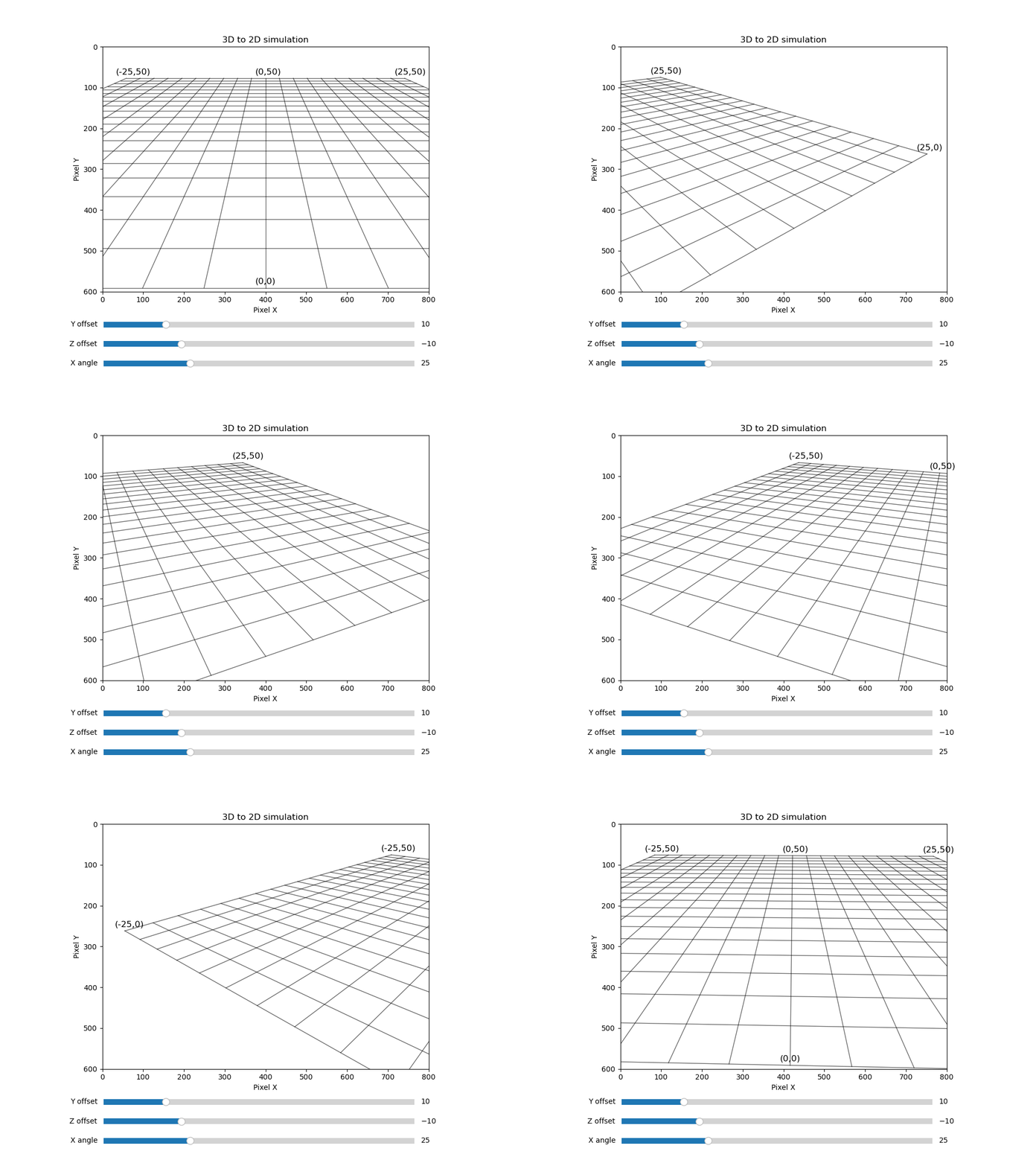
The python code for the Forward Transformation Simulation is available here:
import numpy as np
import math
import matplotlib.pyplot as plt
from matplotlib import animation
from matplotlib.widgets import Slider


# Camera image width and height
w, h = 800, 600
# Focal length based on the camera image
f = max(w, h)

# The flat gridnet on X-Z-level
x_lines = np.linspace(-25, 25, 21)
z_lines = np.linspace(0, 50, 21)
z_wave = np.linspace(z_lines.min(), z_lines.max(), 100)
x_wave = np.linspace(x_lines.min(), x_lines.max(), 100)

fig, ax = plt.subplots(figsize=(10, 7.5))
lines = []

# Initial drawing of empty lines
# Lines parallel to z-axis
for x in x_lines:
    line, = ax.plot([], [], color='black', linewidth=1, alpha=0.6)
    lines.append(('z', x, line))

# Lines parallel to x-axis
for z in z_lines:
    line, = ax.plot([], [], color='black', linewidth=1, alpha=0.6)
    lines.append(('x', z, line))

# Gridnet coordinates
labels_3d = [
    (0, 0, 0, "(0,0)"),
    (-25, 0, 0, "(-25,0)"),
    (25, 0, 0, "(25,0)"),
    (-25, 0, 50, "(-25,50)"),
    (25, 0, 50, "(25,50)"),
    (0, 0, 50, "(0,50)")
]

# Text objects list and format
text_objects = []
for x_3d, y_3d, z_3d, label_text in labels_3d:
    txt = ax.text(0, 0, label_text, color='black', fontsize=12)
    text_objects.append((x_3d, y_3d, z_3d, txt))
# Number of animated frames
NoFrames = 200

ax.set_title("3D to 2D simulation")

# Sliders to control perspective view
plt.subplots_adjust(bottom=0.25)
slider_yo = plt.axes([0.2, 0.15, 0.6, 0.03])
yoff_slider = Slider(slider_yo, 'Y offset', -10.0, 90.0, valinit=10.0)
slider_zo = plt.axes([0.2, 0.1, 0.6, 0.03])
zoff_slider = Slider(slider_zo, 'Z offset', -20.0, 20.0, valinit=-10.0)
slider_xa = plt.axes([0.2, 0.05, 0.6, 0.03])
xang_slider = Slider(slider_xa, 'X angle', 0.0, 90.0, valinit=25.0)

point, = ax.plot([], [], 'ro', ms=8, label='Real Position')
info = ax.text(0.15, 0.90, '', transform=ax.transAxes, fontsize=12,
                    bbox=dict(boxstyle='round', facecolor='wheat', alpha=0.5))

# Animation update
def update(frame):

    # Read slider content
    y_offset = yoff_slider.val
    z_offset = zoff_slider.val
    x_angle = xang_slider.val
    y_angle = np.sin(6.28*(frame/NoFrames)) * 45

    # Calculate perspective matrix
    M_4x4 = PerspectiveTransformation(-z_offset, -y_offset, 0, 0, -x_angle, y_angle)

    # Draw z,x-grid viewed by u,v-camera coordinates
    for type, val, line in lines:
        if type == 'z':
            X_3d = np.full_like(z_wave, val)
            Y_3d = np.zeros_like(z_wave)
            Z_3d = z_wave
        else:
            X_3d = x_wave
            Y_3d = np.zeros_like(x_wave)
            Z_3d = np.full_like(x_wave, val)

        u, v = Transform(X_3d, Y_3d, Z_3d, M_4x4)
        line.set_data(u, v)

    # Draw Gridnet coordinates
    updated_texts = []
    for x_3d, y_3d, z_3d, txt_obj in text_objects:
        u, v = Transform(np.array([x_3d]), np.array([y_3d]), np.array([z_3d]), M_4x4)

        in_view_x = 0 <= u[0] <= w
        in_view_y = 0 <= v[0] <= h

        if in_view_x and in_view_y:
            txt_obj.set_position((u[0]-25, v[0]-10))
            txt_obj.set_visible(True)
        else:
            txt_obj.set_visible(False)

        updated_texts.append(txt_obj)

    return [l[2] for l in lines] + updated_texts

# Animation
ani = animation.FuncAnimation(fig, update, frames=NoFrames, interval=30, blit=False)

print("Start animation...")
ax.set_xlim(0, w)
ax.set_ylim(h, 0)
ax.set_xlabel("Pixel X")
ax.set_ylabel("Pixel Y")
ax.set_aspect('equal', adjustable='box')
plt.show()Backward Transformation: 2D Image to 3D Space
Because a 2D image is flat, pixel coordinate lacks depth and represents an infinite ray extending out from the lens.
We find the specific 3D coordinate on the ground plane () by intersecting this ray.
Inverse Intrinsic Projection
We extract a normalized direction vector from pixel inputs using the inverse camera intrinsic matrix:
\mathbf{p}_{norm} = \mathbf{B}_f^{-1} \cdot \begin{bmatrix} x_B' \\ y_B' \\ 0 \\ 0 \\ \end{bmatrix}To avoid inverse matrix calculation we again start with imaging law but this time the opposite way as done in forward transformation:
A=\frac{B}{b}\cdot aDistance b is fixed based on the camera and can be calculated also using Imaging Law by the max Dimension of the CCD chip:
b=\frac{B_{max}}{A_{max}}\cdot a_0where are the height and distance of the object causing .
Using Camera CCD’s absolute range input
A=\left(B'-\frac{B_{max}}{2}\right) \cdot \frac{a}{a_0} \cdot \frac{A_{max}}{B_{max}}For moving objects we introduce the time dependency noted as :
A_{(t)}=\left(B'_{(t)}-\frac{B_{max}}{2}\right) \cdot \frac{a_{(t)}}{a_0} \cdot \frac{A_{max}}{B_{max}}Replacing time dependent variables considering Y-axis only, we receive:
y_{A,t}=\left(y_{B',t}-\frac{B_{max}}{2}\right) \cdot \frac{z_{a,t}}{a_0} \cdot \frac{A_{max}}{B_{max}} For discrete values based on CCD’s chip resolution on Y-axis () and X-axis () according to Image processing SW like OpenCV (Y-axis inverted) we adapt the equation as followed:
\begin{aligned}
y_{A,t} \cdot \frac{1}{z_{A,t}}=\left(-y'_{B,t}+\frac{H}{2}\right) \cdot \frac{A_{y,max}}{a_0 \cdot H} \\
x_{A,t} \cdot \frac{1}{z_{A,t}}=\left(x'_{B,t}-\frac{W}{2}\right) \cdot \frac{A_{x,max}}{a_0 \cdot W}
\end{aligned}
Now we can extend the equation to 3D by introducing following 4×4 Matrix with a 4×1 Input Vector.
\mathbf{p}_{real}=\mathbf{B}_b \cdot \mathbf{p}'_{cam} \begin{bmatrix}
x_A\; \frac{1}{z_A}\\
y_A\; \frac{1}{z_A}\\
0 \\
1 \\
\end{bmatrix}
=
\begin{bmatrix}
\frac{A_{x,max}}{W\:a_0} & 0 & 0 & -\frac{A_{x,max}}{2\:a_0} \\
0 & -\frac{A_{y,max}}{W\:a_0} & 0 & \frac{A_{y,max}}{2\:a_0} \\
0 & 0 & 1 & 0 \\
0 & 0 & 0 & 0 \\
\end{bmatrix} \cdot
\begin{bmatrix}
x_{B}' \\
y_{B}' \\
0 \\
0 \\
\end{bmatrix}To normalize the real world point the distance will be ignored (for now only) and set to one:
\mathbf{p}_{norm}=\mathbf{p}_{real}\big|_{z_A=1}=\begin{bmatrix}
 x_A \\
 y_A \\
 0 \\
 0 \\
 \end{bmatrix}
If a point of interest (POI) is not at the center of the camera, we calculate the delta rotation (, ) to determine the look-vector of the camera.
\begin{bmatrix}
 \beta' \\
 \alpha' \\
 0 \\
 0 \\
\end{bmatrix}=\begin{bmatrix}
\beta \\
\alpha \\
 0 \\
 0 \\
 \end{bmatrix}-\begin{bmatrix}
\Delta \beta \\
\Delta \alpha \\
 0 \\
 0 \\
\end{bmatrix}=\begin{bmatrix}
\beta  \\
\alpha \\
 0 \\
 0 \\
 \end{bmatrix}-\arctan(\mathbf{p}_{norm})
World Coordinate Camera Center
The absolute 3D position of the camera center in world space is computed by reversing the camera translation and rotation properties:
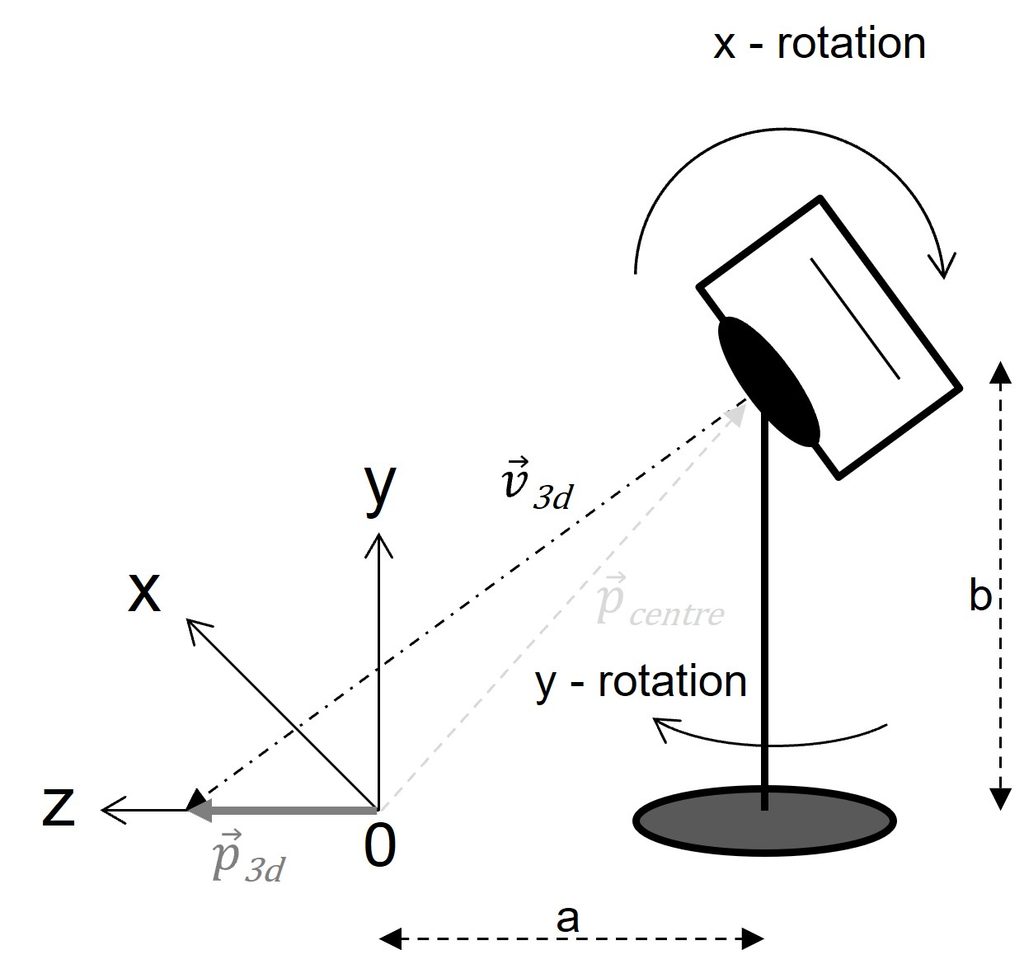
Rotation X-axis (tilt=bend) with angle due to delta rotation :
\mathbf{R}_{x,\alpha'}=\begin{bmatrix}
 1 & 0 & 0 & 0 \\
 0 & cos(\alpha') & -sin(\alpha') & 0 \\
 0 & sin(\alpha') & cos(\alpha') & 0 \\
 0 & 0 & 0 & 1 \\
\end{bmatrix}
Movement d on Z-axis:
\mathbf{T}_x=\begin{bmatrix}
 1 & 0 & 0 & 0 \\
 0 & 1 & 0 & 0 \\
 0 & 0 & 1 & d \\
 0 & 0 & 0 & 1 \\
\end{bmatrix}
Rotation Y-axis (pan=turn) with angle due to delta rotation :
\mathbf{R}_{y,\beta'}=\begin{bmatrix}
 cos(-\beta') & 0 & -sin(-\beta') & 0 \\
 0 & 1 & 0 & b \\
 sin(-\beta') & 0 & cos(-\beta') & 0 \\
 0 & 0 & 0 & 1 \\
\end{bmatrix}
Movement b on Y-axis, c on Z-axis:
\mathbf{T}_y=\begin{bmatrix}
 1 & 0 & 0 & 0 \\
 0 & 1 & 0 & -b \\
 0 & 0 & 1 & -c \\
 0 & 0 & 0 & 1 \\
\end{bmatrix}
Movement a on Z-axis:
\mathbf{T}_r=\begin{bmatrix}
 1 & 0 & 0 & 0 \\
 0 & 1 & 0 & 0 \\
 0 & 0 & 1 & -a \\
 0 & 0 & 0 & 1 \\
\end{bmatrix}
Get the real 3D coordinates from camera center point:
\vec{p}_{centre}=\mathbf{T}_r \cdot (\mathbf{R}_{y,\beta'} \cdot \mathbf{T}_y) \cdot (\mathbf{R}_{x,\alpha'} \cdot \mathbf{T}_x) \cdot \begin{bmatrix}
0 \\
0 \\
0 \\
1 \\
\end{bmatrix}
Intersection with the Ground Plane ()
Letting represent the 3D direction vector of the ray projected through the pixel coordinate, the points along the path are represented parametrically as:
\begin{align}
\vec{v}_{3d}=\mathbf{R}_{y,\beta'} \cdot \mathbf{R}_{x,\alpha'} \cdot \begin{bmatrix}
 0 \\
 0 \\
 1 \\
 1 \\
\end{bmatrix} \\
\vec{p}_{3d}=\vec{p}_{centre}+k \cdot \vec{v}_{3d}
\end{align}
For the intersection on the ground plane, we enforce and solving for the scaling parameter :
k = \frac{\vec{p}_{3d} - \vec{p}_{centre}}{\vec{v}_{3d}} = \frac{p_{y,3d} - p_{y,centre}}{v_{y,3d}} = \frac{0 - p_{y,centre}}{v_{y,3d}}Substituting back into the original parametric equation yields the exact world coordinate of the point on the ground.
If the Z-part shall be offset free the Z-shift needs to be subtracted.
\mathbf{\vec{p}}_{3d}=\begin{bmatrix}
 p_{x,3d} \\
 p_{y,3d} \\
 p_{z,3d} \\
\end{bmatrix} = \begin{bmatrix}
 p_{x,centre} + k \cdot v_{x,3d} \\
 0 \\
 (p_{z,centre}-a) + k \cdot v_{z,3d}
\end{bmatrix}
Simulation Backward Transformation
The camera views on a grid where a ball is moving. The distance of the ball on the grid to the camera and the camera views distance to the ball is displayed in the simulation.
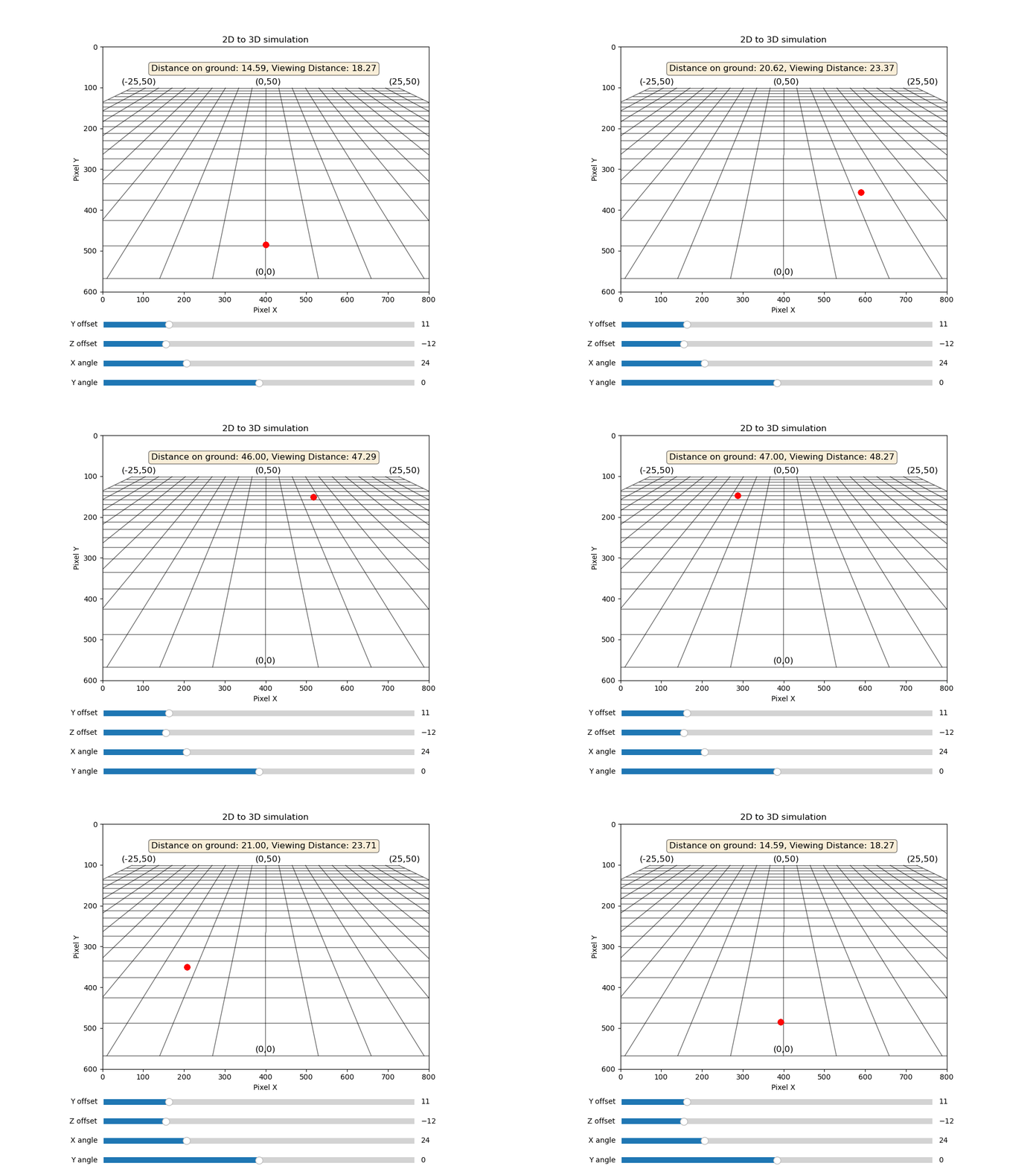
The python code for the Backward Transformation Simulation is based on Forward Transformation shown above and is available here:
import numpy as np
import math
import matplotlib.pyplot as plt
from matplotlib import animation
from matplotlib.widgets import Slider


# Camera image width and height
w, h = 800, 600
# Focal length based on the camera image
f = max(w, h)

# The flat gridnet on X-Z-level
x_lines = np.linspace(-25, 25, 21)
z_lines = np.linspace(0, 50, 21)
z_wave = np.linspace(z_lines.min(), z_lines.max(), 100)
x_wave = np.linspace(x_lines.min(), x_lines.max(), 100)

fig, ax = plt.subplots(figsize=(10, 7.5))
lines = []

# Initial drawing of empty lines
# Lines parallel to z-axis
for x in x_lines:
    line, = ax.plot([], [], color='black', linewidth=1, alpha=0.6)
    lines.append(('z', x, line))

# Lines parallel to x-axis
for z in z_lines:
    line, = ax.plot([], [], color='black', linewidth=1, alpha=0.6)
    lines.append(('x', z, line))

# Gridnet coordinates
labels_3d = [
    (0, 0, 0, "(0,0)"),
    (-25, 0, 0, "(-25,0)"),
    (25, 0, 0, "(25,0)"),
    (-25, 0, 50, "(-25,50)"),
    (25, 0, 50, "(25,50)"),
    (0, 0, 50, "(0,50)")
]

# Text objects list and format
text_objects = []
for x_3d, y_3d, z_3d, label_text in labels_3d:
    txt = ax.text(0, 0, label_text, color='black', fontsize=12)
    text_objects.append((x_3d, y_3d, z_3d, txt))

# Perspective transformation matrice calculation
def PerspectiveForwardTransformation(a, b, c, d, x_rot, y_rot):

    # x-axis rotation
    ax = math.radians(x_rot)
    # y-axis rotation
    by = math.radians(y_rot)

    # Camera Matrix
    Bf = np.array([
        [f, 0.0, w/2, 0.0],
        [0.0, -f, h/2, 0.0],
        [0.0, 0.0, 1.0, 0.0],
        [0.0, 0.0, 1.0, 0.0]
    ], dtype=np.float32)

    # Movement d on z-axis and Rotation about x-axis Matrix
    Rx = np.array([
        [1.0, 0.0, 0.0, 0.0],
        [0.0, math.cos(ax), -math.sin(ax), 0.0],
        [0.0, math.sin(ax), math.cos(ax), d],
        [0.0, 0.0, 0.0, 1.0],
    ], dtype=np.float32)

    # Movement b on y-axis, c on z-axis and Rotation about y-axis Matrix
    Ry = np.array([
        [math.cos(by), 0.0, -math.sin(by), 0.0],
        [0.0, 1.0, 0.0, b],
        [math.sin(by), 0.0, math.cos(by), c],
        [0.0, 0.0, 0.0, 1.0],
    ], dtype=np.float32)

    # Movement a on z-axis Matrix
    Tr = np.array([
        [1.0, 0.0, 0.0, 0.0],
        [0.0, 1.0, 0.0, 0.0],
        [0.0, 0.0, 1.0, a],
        [0.0, 0.0, 0.0, 1.0],
    ], dtype=np.float32)

    RT_4x4 = Bf @ Rx @ Ry @ Tr

    return RT_4x4

# Perspective transformation matrice calculation
def PerspectiveBackTransformation(a, b, c, d, x_rot, y_rot, cam_pnt, y_level):

    #  Camera Matrix
    Bb = np.array([
        [1/f, 0.0, 0.0, (-w/(2.0*f))],
        [0.0, -1/f, 0.0, (h/(2.0*f))],
        [0.0, 0.0, 1.0, 0.0],
        [0.0, 0.0, 0.0, 1.0]
    ], dtype=np.float32)

    # Calculate camera coordinates to real coordinates
    cam_pnt_real = Bb @ cam_pnt

    # A point of interest (POI) outside camera centre will result in a delta x and y rotation angles
    by_delta = math.atan(cam_pnt_real[0,0])
    ax_delta = math.atan(cam_pnt_real[1,0])

    # x-axis rotation
    ax = math.radians(x_rot) - ax_delta
    # y-axis rotation
    by = (math.radians(y_rot) - by_delta)

    # Rotation about x-axis Matrix
    Rx = np.array([
        [1.0, 0.0, 0.0, 0.0],
        [0.0, math.cos(ax), -math.sin(ax), 0.0],
        [0.0, math.sin(ax), math.cos(ax), 0.0],
        [0.0, 0.0, 0.0, 1.0],
    ], dtype=np.float32)

    # Movement d on z-axis
    Tx = np.array([
        [1.0, 0.0, 0.0, 0.0],
        [0.0, 1.0, 0.0, 0.0],
        [0.0, 0.0, 1.0, -d],
        [0.0, 0.0, 0.0, 1.0],
    ], dtype=np.float32)

    # Rotation about y-axis Matrix
    Ry = np.array([
        [math.cos(-by), 0.0, -math.sin(-by), 0.0],
        [0.0, 1.0, 0.0, 0.0],
        [math.sin(-by), 0.0, math.cos(-by), 0.0],
        [0.0, 0.0, 0.0, 1.0],
    ], dtype=np.float32)

    # Movement b on y-axis, c on z-axis
    Ty = np.array([
        [1.0, 0.0, 0.0, 0.0],
        [0.0, 1.0, 0.0, -b],
        [0.0, 0.0, 1.0, -c],
        [0.0, 0.0, 0.0, 1.0],
    ], dtype=np.float32)

    # Movement a on z-axis Matrix
    Tr = np.array([
        [1.0, 0.0, 0.0, 0.0],
        [0.0, 1.0, 0.0, 0.0],
        [0.0, 0.0, 1.0, -a],
        [0.0, 0.0, 0.0, 1.0],
    ], dtype=np.float32)

    RT_4x4 = Tr @ (Ry @ Ty) @ (Rx @ Tx)

    # Separate the rotation matrices
    R_4x4 = Ry @ Rx

    cam_pnt_centre_real = np.array([
        [0.0],
        [0.0],
        [0.0],
        [1.0]
    ], dtype=np.float32)

    # Get the real 3d coordinates from camera centre point
    pts_3d_real_offset = RT_4x4 @ cam_pnt_centre_real

    # Get the vector pointing from camera plane to real 3d plane
    u_vec = np.array([
        [0.0],
        [0.0],
        [1.0],
        [1.0]
    ], dtype=np.float32)
    pts_3d_real_grad = R_4x4 @ u_vec

    # y_level: The y-value where the z-value to be calculated (With one camera y-value needs to be given)
    # k: Length of vector pointing to the z-position meeting y_level
    k = (y_level-pts_3d_real_offset[1,0])/pts_3d_real_grad[1,0]
    # X and Z part where Z part to be calculated offset free
    z_3d_real = (pts_3d_real_offset[2,0]-RT_4x4[2,3]) + (k * pts_3d_real_grad[2,0])
    x_3d_real = pts_3d_real_offset[0,0] + (k * pts_3d_real_grad[0,0])

    # Resulting 3d real coordinates
    pts_3d_real_dir = np.array([
        [0.0],
        [0.0],
        [0.0],
        [1.0]
    ], dtype=np.float32)

    pts_3d_real_dir[0] = x_3d_real
    pts_3d_real_dir[1] = y_level
    pts_3d_real_dir[2] = z_3d_real

    return [pts_3d_real_dir, k]


# Transformation calculation
def Transform(X_3d, Y_3d, Z_3d, M_4x4):

    ones = np.ones_like(X_3d)
    # Real world coordinates
    pts_3d_hom = np.vstack([X_3d, Y_3d, Z_3d, ones])

    # Transform to camera coordinates
    pts_transformed = M_4x4 @ pts_3d_hom
    # Camera coordinates
    camera_coords = pts_transformed[:3, :]

    # Camera points width (u) and height (v) coordinates
    u = camera_coords[0] / camera_coords[2]
    v = camera_coords[1] / camera_coords[2]

    # Avoid unintended lines
    z_near = 0.1
    invalid_mask = pts_transformed[2] <= z_near
    u[invalid_mask] = np.nan
    v[invalid_mask] = np.nan

    return u, v

# Number of animated frames
NoFrames = 200

ax.set_title("2D to 3D simulation")

# Sliders to control perspective view
plt.subplots_adjust(bottom=0.25)
slider_yo = plt.axes([0.2, 0.15, 0.6, 0.03])
yoff_slider = Slider(slider_yo, 'Y offset', -10.0, 90.0, valinit=11.0)
slider_zo = plt.axes([0.2, 0.1, 0.6, 0.03])
zoff_slider = Slider(slider_zo, 'Z offset', -20.0, 20.0, valinit=-12.0)
slider_xa = plt.axes([0.2, 0.05, 0.6, 0.03])
xang_slider = Slider(slider_xa, 'X angle', 0.0, 90.0, valinit=24.0)
slider_ya = plt.axes([0.2, 0.00, 0.6, 0.03])
yang_slider = Slider(slider_ya, 'Y angle', -90.0, 90.0, valinit=0.0)

point, = ax.plot([], [], 'ro', ms=8, label='Real Position')
info = ax.text(0.15, 0.90, '', transform=ax.transAxes, fontsize=12,
                    bbox=dict(boxstyle='round', facecolor='wheat', alpha=0.5))


# Animation update
def update(frame):

    # Read slider content
    y_offset = yoff_slider.val
    z_offset = zoff_slider.val
    x_angle = xang_slider.val
    y_angle = yang_slider.val

    # Calculate perspective matrix
    M_4x4 = PerspectiveForwardTransformation(-z_offset, -y_offset, 0, 0, -x_angle, y_angle)

    # Camera point of interest (POI)
    pts_2d_cam = np.array([
        [0.0],
        [0.0],
        [0.0],
        [1.0]
    ], dtype=np.float32)
    pts_2d_cam[0] = round((w/2.0) + (np.sin(6.28*(frame/NoFrames)) * (w/4.0)))
    pts_2d_cam[1] = round((h/2.0) + (np.cos(6.28*(frame/NoFrames)) * (h/3.25)))
    point.set_data([pts_2d_cam[0,0]], [pts_2d_cam[1,0]])

    # Get the 3d real coordinates from POI
    [pnt, l] = PerspectiveBackTransformation(z_offset, -y_offset, 0, 0, x_angle, y_angle, pts_2d_cam, 0.0)
    # Calculate distance on ground (Z plane)
    dist = math.sqrt((pnt[0,0] * pnt[0,0])+(pnt[2,0] * pnt[2,0]))
    info.set_text(f"Distance on ground: {dist:.2f}, Viewing Distance: {l:.2f}")

    # Draw z,x-grid viewed by u,v-camera coordinates
    for type, val, line in lines:
        if type == 'z':
            X_3d = np.full_like(z_wave, val)
            Y_3d = np.zeros_like(z_wave)
            Z_3d = z_wave
        else:
            X_3d = x_wave
            Y_3d = np.zeros_like(x_wave)
            Z_3d = np.full_like(x_wave, val)

        u, v = Transform(X_3d, Y_3d, Z_3d, M_4x4)
        line.set_data(u, v)

    # Draw Gridnet coordinates
    updated_texts = []
    for x_3d, y_3d, z_3d, txt_obj in text_objects:
        u, v = Transform(np.array([x_3d]), np.array([y_3d]), np.array([z_3d]), M_4x4)

        in_view_x = 0 <= u[0] <= w
        in_view_y = 0 <= v[0] <= h

        if in_view_x and in_view_y:
            txt_obj.set_position((u[0]-25, v[0]-10))
            txt_obj.set_visible(True)
        else:
            txt_obj.set_visible(False)

        updated_texts.append(txt_obj)

    return [l[2] for l in lines] + updated_texts

# Animation
ani = animation.FuncAnimation(fig, update, frames=NoFrames, interval=30, blit=False)

print("Start animation...")
ax.set_xlim(0, w)
ax.set_ylim(h, 0)
ax.set_xlabel("Pixel X")
ax.set_ylabel("Pixel Y")
ax.set_aspect('equal', adjustable='box')
plt.show()Conclusion
Perspective transformation is the bridge between the physical world and digital data. By mastering the 4×4 matrix conventions and the inverse projection logic, you can accurately track objects, calibrate camera systems, and build robust spatial awareness tools.
Are you working on a computer vision project? Mastering the “look-vector” intersection is the most common hurdle—remember that your results are only as accurate as your extrinsic calibration!